What Is Claude Cowork? 8 Business Automation Use Cases That Save Hours Weekly

By
Jan Meinecke
・
・
5
Min
What Is Claude Cowork? 8 Business Automation Use Cases That Save Hours Weekly
By
jan Meinecke
5
Min
We’ve trained over 20,000 business professionals on AI tools. The pattern is consistent: most teams use AI to ask questions, not to get work done. They open ChatGPT, type a prompt, read the answer, and go back to the same manual process. Claude Cowork is the first tool we’ve seen that genuinely breaks that loop.
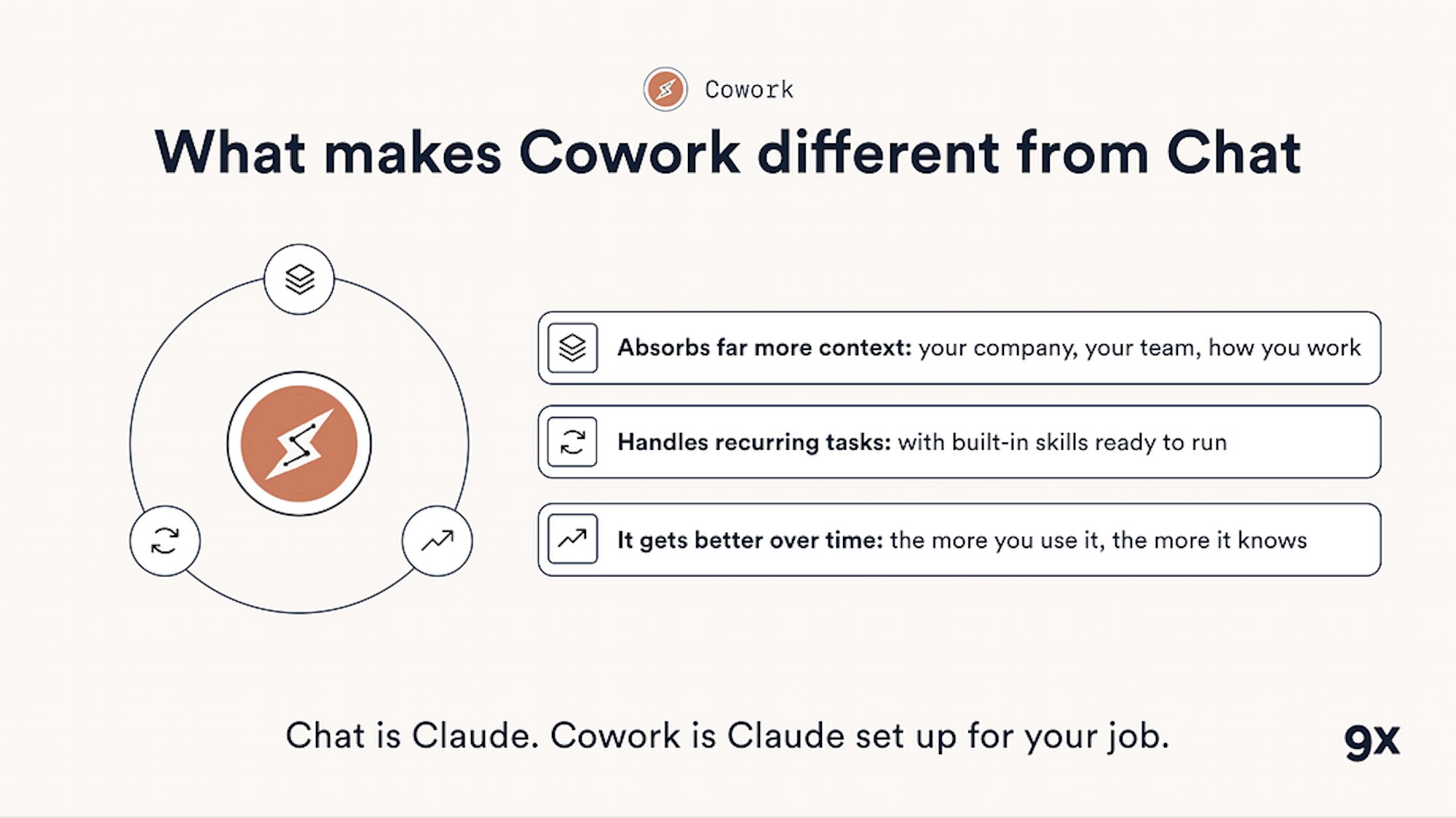
Claude Cowork is Anthropic’s agentic AI tool that works directly on your desktop, reading files, connecting to applications, and completing multi-step workflows without manual intervention. Where regular Claude lives in a chat window, Cowork operates as a digital teammate: you describe the outcome you need, and it plans and executes the work while you focus on higher-value tasks.
The market context backs up what we’re seeing on the ground. McKinsey research estimates that about 60% of occupations have at least 30% of tasks that are automatable. Persistence Market Research values the global business process automation market at $15.3 billion in 2025, projected to reach $33.4 billion by 2032. But most organisations struggle to capture these gains because traditional automation tools require technical setup and ongoing maintenance. Cowork lowers that barrier by putting AI automation where knowledge work actually happens: your desktop, your files, your daily applications.
From Chat to Action: How Claude Cowork Actually Works
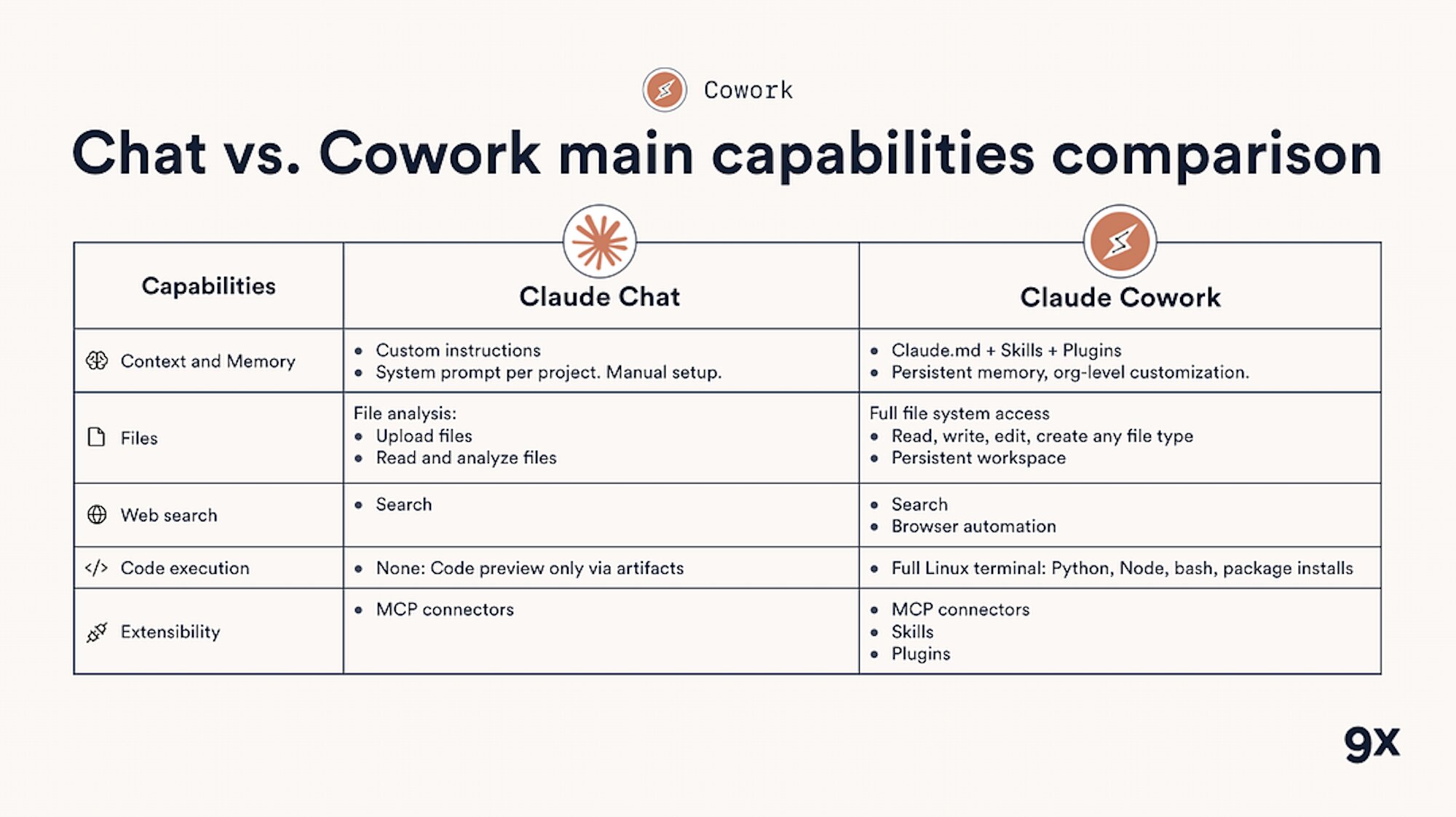
Regular Claude is a consultant. Claude Cowork is an employee.
With Cowork, you describe an outcome, step away, and come back to finished work: formatted documents, organised files, synthesised research, and more. The system runs through the Claude desktop app on macOS and Windows. As of April 2026, Cowork is generally available across all paid Claude plans, starting at $20/month (Pro) with higher usage limits on Max ($100–200/month), Team, and Enterprise plans.
Once activated, Cowork can read and edit files in folders you grant access to, connect to business applications through connectors and plugins, execute multi-step workflows without manual intervention, schedule recurring tasks on your timeline, and generate professional outputs like spreadsheets, presentations, and reports.
The difference from regular Claude: Cowork has access to the local files you grant it permission to access and can take real actions on your behalf. Before anything significant happens, it shows you the plan and waits for approval. This transforms AI from a question-and-answer tool into an autonomous work executor with human oversight built in.
How to Decide What’s Worth Automating
Before jumping into use cases, it’s worth explaining how we teach teams to evaluate what’s worth automating in the first place. Not every task is a good candidate, and the teams that get the most value from tools like Cowork are the ones that pick their targets deliberately.
The best automation candidates share four characteristics: they’re repetitive (you do them at least weekly), time-consuming (they eat 30+ minutes per occurrence), low-judgment (the steps are predictable, even if they touch multiple tools), and currently manual (no one’s built a workflow for them yet). Email triage, report assembly, file organisation, and competitive research all tick every box. Strategic analysis, creative direction, and relationship-building don’t.
This framework is central to how we structure the AI Literacy Track. Before anyone touches a tool, they learn to audit their own workflows and identify the 3–5 processes where automation will deliver the fastest, most measurable return. That thinking applies whether you’re using Cowork, Make, n8n, or any other automation platform.
8 Use Cases We’re Seeing Teams Build With Cowork
1. Content Repurposing for Social Media (1–2 Hours Saved Weekly)
One of the first things our content ops learners automate is the webinar-to-social pipeline. Most teams do this manually: watch the recording, find the best moments, cut clips, write captions. Cowork handles the analysis: feed it the transcript, and it identifies the strongest segments, prepares a cut list with timestamps and speaker attributions, and drafts platform-specific captions.
You still need a video editor or a tool like Descript for the actual cuts, but the research-and-prep stage, which is where most of the time goes, collapses from hours to minutes. At 1–2 hours saved per week, that’s 50–100 hours a year your content team gets back.
2. CRM-Integrated Email Drafting (30 Minutes Saved Per Campaign)
Instead of drafting emails in a Google Doc and recreating them inside your email platform, Cowork generates campaign-ready emails that follow your brand guidelines and template structure, complete with subject lines and CTAs. Teams using tools like HubSpot or ActiveCampaign can connect Cowork via plugins to draft directly inside their workflow.
This is a good example of where Cowork complements rather than replaces your existing stack. The CRM still sends the emails. Cowork handles the creation and formatting that used to eat 30 minutes of someone’s morning.
3. Competitive Intelligence Reports (3 Weeks Compressed to Minutes)
Competitive analysis is one of the highest-ROI automation targets we see in our workshops. The manual version takes an analyst weeks of intermittent research: reviewing competitor websites, scanning ad libraries, reading landing pages, compiling it all into a deck. Cowork does this systematically through its browser connector, examining competitor sites and public marketing materials, then compiling a formatted report with actionable recommendations.
Point it at a competitor’s domain and ad library. It examines landing page strategies, reviews messaging patterns, and delivers a structured brief. What took three weeks becomes a 10-minute automated task you can schedule daily or weekly.
4. Dynamic Brand Asset Generation (2–3 Hours Saved Per Event)
Companies running regular events need consistent asset creation: thumbnails, social graphics, and promotional materials. Cowork generates these from templates, automatically adjusting speaker names, dates, logos, and brand elements based on event details you provide. The design bottleneck that slows marketing teams before every webinar or conference disappears.
5. Content Migration Between Platforms (45 Minutes Saved Per Article)
Publishing content across multiple platforms creates formatting headaches that no one wants to own. Cowork takes content from a tool like Notion and reformats it for your website CMS, community platform, or documentation system, preserving image downloads, video embeds, and platform-specific requirements. Nothing gets lost in translation between tools.
6. Report Generation from Survey Data (4–6 Hours Saved Per Report)
Post-event surveys and customer feedback typically require manual analysis and report creation. Cowork processes raw survey responses, identifies patterns and outliers, and generates professionally formatted reports ready for stakeholder review. For a team running monthly NPS surveys or quarterly engagement reports, this eliminates the most tedious part of the feedback loop.
7. Intelligent Email Triage and Response (1 Hour Saved Daily)
Email triage is the automation use case we recommend teams start with. The risk is low, the time savings are immediate, and it builds confidence with the tool fast. Cowork monitors incoming emails, filters noise, identifies messages that need action, and drafts responses based on your communication patterns. It connects to both email platforms and project management tools, turning important messages into trackable tasks rather than letting them get buried.
8. Custom Skill Creation for Recurring Workflows (Compounds Over Time)
Cowork’s most powerful feature: after you walk through a complex workflow once, the system creates a reusable skill that handles similar tasks automatically from that point on. Every manual process your team repeatedly handles becomes a candidate for permanent automation, from data extraction to report formatting to content publishing. The more skills you build, the more time the tool saves.
Where Cowork Fits (and Where It Doesn’t)
We train teams across a wide range of automation tools, and the most important skill isn’t mastering any single one. It’s knowing which tool to reach for. Cowork is excellent for desktop-native work: file processing, research synthesis, document generation, and anything that involves reading local files and producing a deliverable. For these tasks, nothing else on the market is as fast to set up or as accessible to non-technical users.
For recurring, scheduled automations that connect multiple SaaS tools, Make or n8n is still the better choice. If you need to build a multi-step workflow that triggers when a form is submitted, updates a CRM, sends a Slack message, and logs the result in Airtable, that’s a Make scenario, not a Cowork task. And for complex AI agent chains with custom logic, Relevance AI or a purpose-built agent framework will give you more control.
The teams that get the most from AI automation are the ones that understand the full landscape, not just one vendor’s product page. That’s the thinking behind our AI Automation Track: it covers the full toolkit, so teams can match the right tool to each workflow rather than forcing everything through a single platform.
Why This Matters Right Now
While most companies are still experimenting with ChatGPT prompts, a growing number are deploying autonomous AI agents that handle real work. The business process automation market is growing at 11.7% annually, and the companies leading are the ones that have gone beyond tool procurement to actual workflow change.
McKinsey’s 2024 Global Survey on AI found that 72% of surveyed organisations had adopted AI in at least one business function, up from 55% the prior year. But adoption at the company level doesn’t mean adoption at the desk level. BCG research shows that 89% of executives say their workforce needs AI skills, yet only 6% have begun upskilling in a meaningful way. That gap between investment and daily usage is exactly what we built 9x to close.
Teams at companies like TravelPerk are already combining structured training with agentic tools to handle 1,000+ support queries weekly, while competitors still rely on manual processes. The difference is not the tool. It’s whether the team has the skills to use it.
Getting Started: Implementation and Pricing
Claude Cowork is included with any paid Claude subscription. The entry point is the Pro plan at $20/month, which gives you full Cowork access with standard usage limits. Max plans ($100–200/month) offer 5–20x more usage for heavier workloads. Team and Enterprise plans add admin controls, usage analytics, and role-based access. The system runs on macOS and Windows through the Claude desktop app.
Start small. We always recommend teams begin with email triage or file organisation: low-risk workflows that show immediate value and build confidence with the tool. Once you’ve seen results, expand to competitive analysis, report generation, or content repurposing.
Review before you approve. Cowork shows you its plan before taking action. Use this. Especially when working with sensitive files or client data, check what Cowork intends to do before letting it proceed.
Go Deeper
Cowork is one of the most accessible AI automation tools available today. But like every tool we teach, its value depends on whether your team knows what to automate, how to structure the workflow, and how to steer an AI agent when it needs course-correcting. That’s what separates teams that experiment from teams that transform how they operate.
If you want to see how far your team can go with AI, join our free community today and access workshops, courses, and tool guides. If you’re ready to train your whole organisation, talk to the 9x team about our AI Tracks for ambitious businesses.
We’ve trained over 20,000 business professionals on AI tools. The pattern is consistent: most teams use AI to ask questions, not to get work done. They open ChatGPT, type a prompt, read the answer, and go back to the same manual process. Claude Cowork is the first tool we’ve seen that genuinely breaks that loop.
Claude Cowork is Anthropic’s agentic AI tool that works directly on your desktop, reading files, connecting to applications, and completing multi-step workflows without manual intervention. Where regular Claude lives in a chat window, Cowork operates as a digital teammate: you describe the outcome you need, and it plans and executes the work while you focus on higher-value tasks.
The market context backs up what we’re seeing on the ground. McKinsey research estimates that about 60% of occupations have at least 30% of tasks that are automatable. Persistence Market Research values the global business process automation market at $15.3 billion in 2025, projected to reach $33.4 billion by 2032. But most organisations struggle to capture these gains because traditional automation tools require technical setup and ongoing maintenance. Cowork lowers that barrier by putting AI automation where knowledge work actually happens: your desktop, your files, your daily applications.
From Chat to Action: How Claude Cowork Actually Works
Regular Claude is a consultant. Claude Cowork is an employee.
With Cowork, you describe an outcome, step away, and come back to finished work: formatted documents, organised files, synthesised research, and more. The system runs through the Claude desktop app on macOS and Windows. As of April 2026, Cowork is generally available across all paid Claude plans, starting at $20/month (Pro) with higher usage limits on Max ($100–200/month), Team, and Enterprise plans.
Once activated, Cowork can read and edit files in folders you grant access to, connect to business applications through connectors and plugins, execute multi-step workflows without manual intervention, schedule recurring tasks on your timeline, and generate professional outputs like spreadsheets, presentations, and reports.
The difference from regular Claude: Cowork has access to the local files you grant it permission to access and can take real actions on your behalf. Before anything significant happens, it shows you the plan and waits for approval. This transforms AI from a question-and-answer tool into an autonomous work executor with human oversight built in.
How to Decide What’s Worth Automating
Before jumping into use cases, it’s worth explaining how we teach teams to evaluate what’s worth automating in the first place. Not every task is a good candidate, and the teams that get the most value from tools like Cowork are the ones that pick their targets deliberately.
The best automation candidates share four characteristics: they’re repetitive (you do them at least weekly), time-consuming (they eat 30+ minutes per occurrence), low-judgment (the steps are predictable, even if they touch multiple tools), and currently manual (no one’s built a workflow for them yet). Email triage, report assembly, file organisation, and competitive research all tick every box. Strategic analysis, creative direction, and relationship-building don’t.
This framework is central to how we structure the AI Literacy Track. Before anyone touches a tool, they learn to audit their own workflows and identify the 3–5 processes where automation will deliver the fastest, most measurable return. That thinking applies whether you’re using Cowork, Make, n8n, or any other automation platform.
8 Use Cases We’re Seeing Teams Build With Cowork
1. Content Repurposing for Social Media (1–2 Hours Saved Weekly)
One of the first things our content ops learners automate is the webinar-to-social pipeline. Most teams do this manually: watch the recording, find the best moments, cut clips, write captions. Cowork handles the analysis: feed it the transcript, and it identifies the strongest segments, prepares a cut list with timestamps and speaker attributions, and drafts platform-specific captions.
You still need a video editor or a tool like Descript for the actual cuts, but the research-and-prep stage, which is where most of the time goes, collapses from hours to minutes. At 1–2 hours saved per week, that’s 50–100 hours a year your content team gets back.
2. CRM-Integrated Email Drafting (30 Minutes Saved Per Campaign)
Instead of drafting emails in a Google Doc and recreating them inside your email platform, Cowork generates campaign-ready emails that follow your brand guidelines and template structure, complete with subject lines and CTAs. Teams using tools like HubSpot or ActiveCampaign can connect Cowork via plugins to draft directly inside their workflow.
This is a good example of where Cowork complements rather than replaces your existing stack. The CRM still sends the emails. Cowork handles the creation and formatting that used to eat 30 minutes of someone’s morning.
3. Competitive Intelligence Reports (3 Weeks Compressed to Minutes)
Competitive analysis is one of the highest-ROI automation targets we see in our workshops. The manual version takes an analyst weeks of intermittent research: reviewing competitor websites, scanning ad libraries, reading landing pages, compiling it all into a deck. Cowork does this systematically through its browser connector, examining competitor sites and public marketing materials, then compiling a formatted report with actionable recommendations.
Point it at a competitor’s domain and ad library. It examines landing page strategies, reviews messaging patterns, and delivers a structured brief. What took three weeks becomes a 10-minute automated task you can schedule daily or weekly.
4. Dynamic Brand Asset Generation (2–3 Hours Saved Per Event)
Companies running regular events need consistent asset creation: thumbnails, social graphics, and promotional materials. Cowork generates these from templates, automatically adjusting speaker names, dates, logos, and brand elements based on event details you provide. The design bottleneck that slows marketing teams before every webinar or conference disappears.
5. Content Migration Between Platforms (45 Minutes Saved Per Article)
Publishing content across multiple platforms creates formatting headaches that no one wants to own. Cowork takes content from a tool like Notion and reformats it for your website CMS, community platform, or documentation system, preserving image downloads, video embeds, and platform-specific requirements. Nothing gets lost in translation between tools.
6. Report Generation from Survey Data (4–6 Hours Saved Per Report)
Post-event surveys and customer feedback typically require manual analysis and report creation. Cowork processes raw survey responses, identifies patterns and outliers, and generates professionally formatted reports ready for stakeholder review. For a team running monthly NPS surveys or quarterly engagement reports, this eliminates the most tedious part of the feedback loop.
7. Intelligent Email Triage and Response (1 Hour Saved Daily)
Email triage is the automation use case we recommend teams start with. The risk is low, the time savings are immediate, and it builds confidence with the tool fast. Cowork monitors incoming emails, filters noise, identifies messages that need action, and drafts responses based on your communication patterns. It connects to both email platforms and project management tools, turning important messages into trackable tasks rather than letting them get buried.
8. Custom Skill Creation for Recurring Workflows (Compounds Over Time)
Cowork’s most powerful feature: after you walk through a complex workflow once, the system creates a reusable skill that handles similar tasks automatically from that point on. Every manual process your team repeatedly handles becomes a candidate for permanent automation, from data extraction to report formatting to content publishing. The more skills you build, the more time the tool saves.
Where Cowork Fits (and Where It Doesn’t)
We train teams across a wide range of automation tools, and the most important skill isn’t mastering any single one. It’s knowing which tool to reach for. Cowork is excellent for desktop-native work: file processing, research synthesis, document generation, and anything that involves reading local files and producing a deliverable. For these tasks, nothing else on the market is as fast to set up or as accessible to non-technical users.
For recurring, scheduled automations that connect multiple SaaS tools, Make or n8n is still the better choice. If you need to build a multi-step workflow that triggers when a form is submitted, updates a CRM, sends a Slack message, and logs the result in Airtable, that’s a Make scenario, not a Cowork task. And for complex AI agent chains with custom logic, Relevance AI or a purpose-built agent framework will give you more control.
The teams that get the most from AI automation are the ones that understand the full landscape, not just one vendor’s product page. That’s the thinking behind our AI Automation Track: it covers the full toolkit, so teams can match the right tool to each workflow rather than forcing everything through a single platform.
Why This Matters Right Now
While most companies are still experimenting with ChatGPT prompts, a growing number are deploying autonomous AI agents that handle real work. The business process automation market is growing at 11.7% annually, and the companies leading are the ones that have gone beyond tool procurement to actual workflow change.
McKinsey’s 2024 Global Survey on AI found that 72% of surveyed organisations had adopted AI in at least one business function, up from 55% the prior year. But adoption at the company level doesn’t mean adoption at the desk level. BCG research shows that 89% of executives say their workforce needs AI skills, yet only 6% have begun upskilling in a meaningful way. That gap between investment and daily usage is exactly what we built 9x to close.
Teams at companies like TravelPerk are already combining structured training with agentic tools to handle 1,000+ support queries weekly, while competitors still rely on manual processes. The difference is not the tool. It’s whether the team has the skills to use it.
Getting Started: Implementation and Pricing
Claude Cowork is included with any paid Claude subscription. The entry point is the Pro plan at $20/month, which gives you full Cowork access with standard usage limits. Max plans ($100–200/month) offer 5–20x more usage for heavier workloads. Team and Enterprise plans add admin controls, usage analytics, and role-based access. The system runs on macOS and Windows through the Claude desktop app.
Start small. We always recommend teams begin with email triage or file organisation: low-risk workflows that show immediate value and build confidence with the tool. Once you’ve seen results, expand to competitive analysis, report generation, or content repurposing.
Review before you approve. Cowork shows you its plan before taking action. Use this. Especially when working with sensitive files or client data, check what Cowork intends to do before letting it proceed.
Go Deeper
Cowork is one of the most accessible AI automation tools available today. But like every tool we teach, its value depends on whether your team knows what to automate, how to structure the workflow, and how to steer an AI agent when it needs course-correcting. That’s what separates teams that experiment from teams that transform how they operate.
If you want to see how far your team can go with AI, join our free community today and access workshops, courses, and tool guides. If you’re ready to train your whole organisation, talk to the 9x team about our AI Tracks for ambitious businesses.
read next
Running AI Enablement Internally? Here are Three Things to Consider
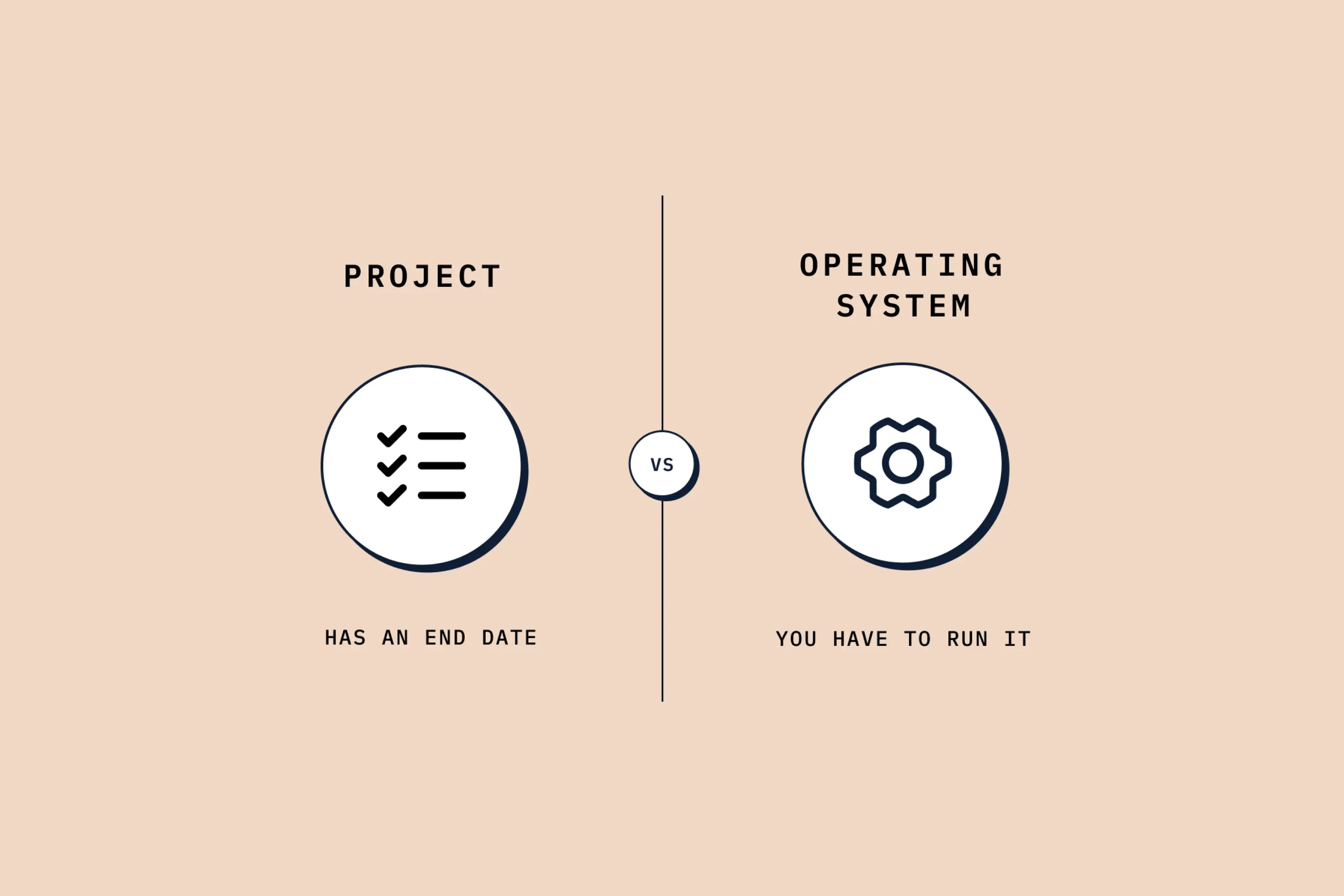
AI enablement looks like a training project. It isn't. Skill levels, tools and functions all move at once. Here's what running it internally really takes.
What is Claude Slides, and How to Use Them (Guide for Beginners)
How to use Claude Slides to build an on-brand deck from a one-line brief, edit and export it, and where it beats PowerPoint and Google Slides, and where it doesn't.
read next
Running AI Enablement Internally? Here are Three Things to Consider
AI enablement looks like a training project. It isn't. Skill levels, tools and functions all move at once. Here's what running it internally really takes.
What is Claude Slides, and How to Use Them (Guide for Beginners)
How to use Claude Slides to build an on-brand deck from a one-line brief, edit and export it, and where it beats PowerPoint and Google Slides, and where it doesn't.