What Are Claude Artifacts? (And How to Share Them)

By
Jan Meinecke
・
・
10
Min
What Are Claude Artifacts? (And How to Share Them)
By
jan Meinecke
10
Min
Claude artifacts are the interactive things Claude builds for you in a session, a web page, a dashboard, a small app, a chart, that appear in their own panel instead of being buried in the chat. The big recent change is that you can now publish them as live, shareable web pages with their own link, so your whole team can open them in a browser with no Claude needed. This guide explains what Claude artifacts are, the new way to share them from Claude Code and Cowork, and what teams are actually building with them.
The short version: artifacts turn what Claude makes into something you can hand to other people, and keep current automatically.
Watch: our walkthrough of the new Claude Code artifacts feature shows the whole thing end to end.
What are Claude artifacts?
An artifact is a self-contained piece of work Claude creates during a conversation and shows in a dedicated panel next to the chat, where you can view, edit, and interact with it in real time. Instead of getting code or content as a wall of text, you get a working thing: a document, a visualisation, or a fully functioning mini-app.
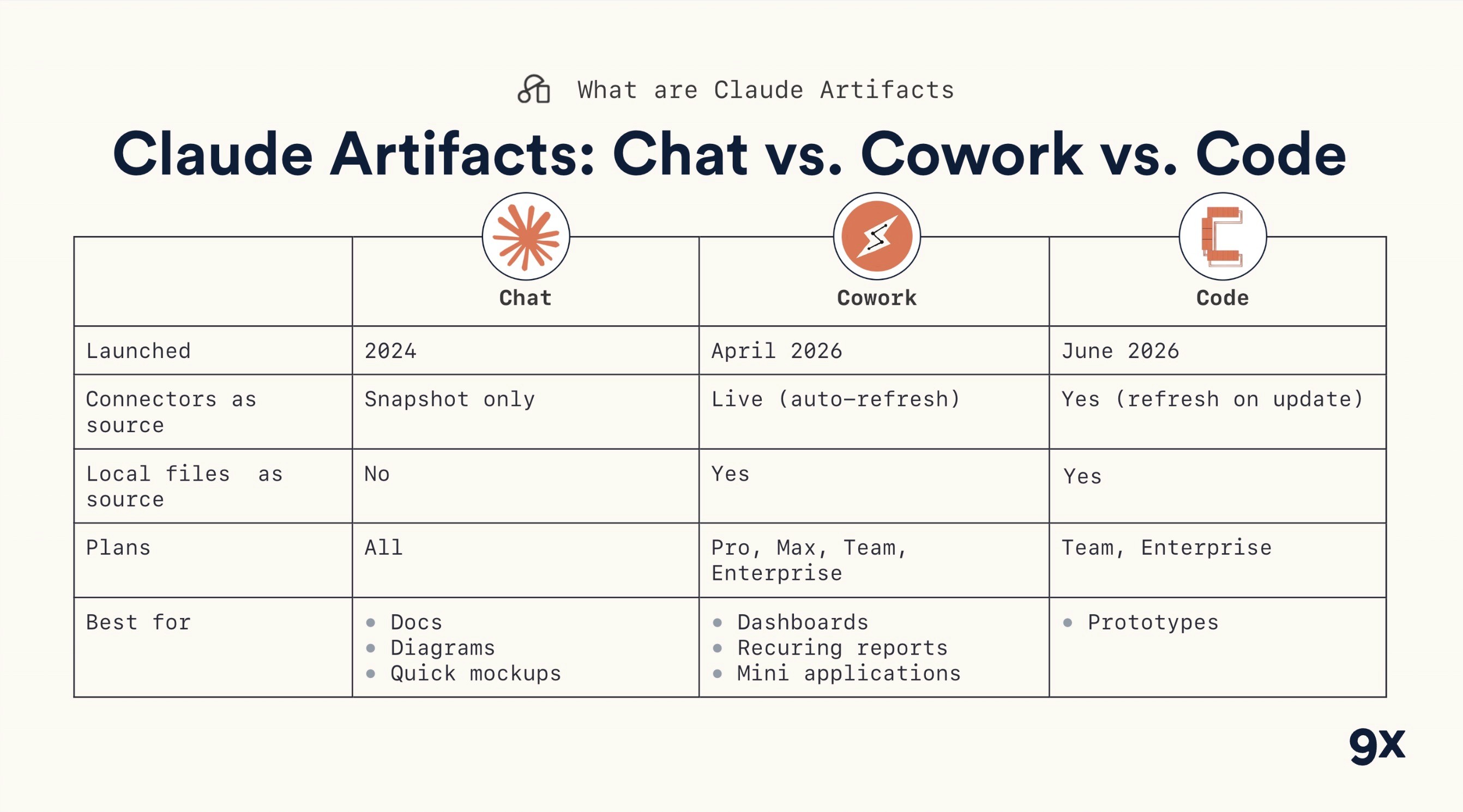
Artifacts have been part of Claude chat for a while, where they're a great way to build small AI-powered apps without writing code. What's new, and what's worth a business team's attention, is that the same idea now reaches across Claude Code and Cowork, and the work can be published and shared as a live page.
The new part: live, shareable artifacts
Until recently, getting something Claude built in front of your team meant exporting a file, taking a screenshot, or hosting it yourself and keeping it updated by hand. The new artifacts feature does that part for you.
Now you can ask Claude Code (or Cowork) to publish what it built as a live artifact. You get a real URL, hosted by Claude, that opens in any browser as a fully interactive page. There are four things worth knowing about it.
First, the pages are live and interactive. If Claude built a landing page with a form, you and your team can fill it in and see it behave, not just look at a picture of it.
Second, the artifact lives at its own link, hosted by Claude, with nothing for you to set up. To let someone view it, you share the link.
Third, it updates itself. When you ask Claude to change the page, anyone with the link sees the latest version, often without even refreshing, and there's a full version history noting what changed.
Fourth, you control sharing and versions, which is the part to get right.
How sharing and permissions work
By default, a new artifact is private, so only the person who created it can see it. From the share settings you can invite specific team members, or open it to everyone in your company.
You also control versioning. There's an option to always share the latest version, which is on by default, so the moment you make a change, everyone is looking at the current page. Turn it off and you can pin a specific version to share, which is useful when you want feedback on one fixed draft rather than a moving target. For the full mechanics, Anthropic's guide to publishing and sharing artifacts covers it.
A nice detail: there's now an Artifacts area in the menu that gathers everything you've made, whether it came from Claude Code, chat, or Cowork, so you can reopen any of them in one click.
What teams are building with artifacts
The point of all this is what it lets a team do. A few patterns are already proving useful.
Shared prototypes and design reviews. Ask Claude to build four different layouts for the same screen, publish it, and your team clicks through real, interactive versions to make a decision, instead of imagining what a mockup would look like built.
Live presentations. Because Claude can build slides as HTML, they can be hosted at a link and even made interactive, a working kanban board inside a deck rather than a screenshot of one.
Self-updating dashboards. This is the one that surprises people. Point Claude at your connectors and ask what would be useful, and it can spin up several agents that pull metrics from your email tool, your YouTube channel, your community, your events platform, and your SEO tools, then build a single dashboard and flag the things that need attention. As one of our co-founders put it, something that "would have taken a BI team a couple of weeks to set up" now appears in seconds. It's an idea worth pairing with agentic workflows, where the same describe-the-outcome approach builds the thing for you.
The current limitation (and who can use it)
One honest caveat: right now you can't take action from inside an artifact. You can make pages interactive, move things around, apply filters, but you can't, say, add a button that fires off another Claude agent or updates a tool. The workaround Anthropic suggests is a "copy as prompt" button: you arrange things in the artifact, copy the result as a prompt, and paste it back into Claude to act on. That manual step is the main thing holding artifacts back from full internal-tooling use today.
On availability, the shareable Claude Code artifacts are in beta and, at the time of writing, limited to team and enterprise plans, accessed through the Claude Code CLI or the desktop app, and an admin has to enable them in your organisation's settings. If you're on an individual plan, you'll see the chat version of artifacts but not the team-sharing feature yet.
A note on where this is heading
It's worth being clear-eyed about what artifacts are today versus where they're going. Right now the value is sharing, turning what Claude builds into a live page your team can open and that stays current. The obvious next step, being able to act from inside an artifact rather than copying a prompt back into Claude, isn't here yet, but the copy-as-prompt workaround hints at the direction. For now, the sweet spot is anything your team needs to look at together and keep up to date: prototypes, decks, and dashboards. Treat artifacts as the fastest way yet to share AI-built work, and the action layer as a bonus to watch for.
Start sharing what Claude builds
Claude artifacts turn what Claude makes from something stuck in your session into something your whole team can open, use, and keep current. Start with a real piece of work, a prototype, a deck, a simple dashboard, publish it, and share the link. Manage who can see it and whether they always get the latest version, and you've replaced a whole loop of exporting, screenshotting, and re-hosting.
If you're running a business rather than writing code all day, there's a version of this built for you. Claude Cowork is the same kind of agent, made for everyday work instead of coding, and our hands-on Claude Cowork training takes your team from their first task to building and sharing real work like this.
Common questions about Claude artifacts
What's the difference between chat artifacts and the new ones? Artifacts have been in Claude chat for a while, where they're great for building small interactive apps. The new part is publishing them as live, shareable web pages from Claude Code and Cowork, with their own link, version history, and team permissions.
Do people I share with need a Claude account? For a published page, no, they open the link in a browser. For AI-powered artifacts, usage counts against each viewer's own Claude limits, not yours, so sharing doesn't cost you.
Who can use the shareable Claude Code artifacts? At the time of writing they're in beta and limited to team and enterprise plans, accessed through the Claude Code CLI or the desktop app, and an admin has to enable them.
Can I stop an artifact from updating? Yes. There's an "always share the latest version" toggle; turn it off and you can pin a specific version to share.
FREE LIVE SESSIONS
What’s the best way to learn AI?
With 9x Live! Join a free session and learn the skills that’ll get you ahead of the 99%.
What to do next
1
Start learning free
Take our AI starter course and apply the latest technologies to your first use case. Completely free. Get started today.
2
Learn it live
Join a free weekly 9x Live session, watch work get automated in real time, and get your questions answered by leading educators. Sign up for the next session.
3
Watch our videos on YouTube
With one of the fastest growing channels in the industry, hundreds of thousands of people watch our tutorials every week. Subscribe here so you never miss a video.

Claude
Claude artifacts are the interactive things Claude builds for you in a session, a web page, a dashboard, a small app, a chart, that appear in their own panel instead of being buried in the chat. The big recent change is that you can now publish them as live, shareable web pages with their own link, so your whole team can open them in a browser with no Claude needed. This guide explains what Claude artifacts are, the new way to share them from Claude Code and Cowork, and what teams are actually building with them.
The short version: artifacts turn what Claude makes into something you can hand to other people, and keep current automatically.
Watch: our walkthrough of the new Claude Code artifacts feature shows the whole thing end to end.
What are Claude artifacts?
An artifact is a self-contained piece of work Claude creates during a conversation and shows in a dedicated panel next to the chat, where you can view, edit, and interact with it in real time. Instead of getting code or content as a wall of text, you get a working thing: a document, a visualisation, or a fully functioning mini-app.
Artifacts have been part of Claude chat for a while, where they're a great way to build small AI-powered apps without writing code. What's new, and what's worth a business team's attention, is that the same idea now reaches across Claude Code and Cowork, and the work can be published and shared as a live page.
The new part: live, shareable artifacts
Until recently, getting something Claude built in front of your team meant exporting a file, taking a screenshot, or hosting it yourself and keeping it updated by hand. The new artifacts feature does that part for you.
Now you can ask Claude Code (or Cowork) to publish what it built as a live artifact. You get a real URL, hosted by Claude, that opens in any browser as a fully interactive page. There are four things worth knowing about it.
First, the pages are live and interactive. If Claude built a landing page with a form, you and your team can fill it in and see it behave, not just look at a picture of it.
Second, the artifact lives at its own link, hosted by Claude, with nothing for you to set up. To let someone view it, you share the link.
Third, it updates itself. When you ask Claude to change the page, anyone with the link sees the latest version, often without even refreshing, and there's a full version history noting what changed.
Fourth, you control sharing and versions, which is the part to get right.
How sharing and permissions work
By default, a new artifact is private, so only the person who created it can see it. From the share settings you can invite specific team members, or open it to everyone in your company.
You also control versioning. There's an option to always share the latest version, which is on by default, so the moment you make a change, everyone is looking at the current page. Turn it off and you can pin a specific version to share, which is useful when you want feedback on one fixed draft rather than a moving target. For the full mechanics, Anthropic's guide to publishing and sharing artifacts covers it.
A nice detail: there's now an Artifacts area in the menu that gathers everything you've made, whether it came from Claude Code, chat, or Cowork, so you can reopen any of them in one click.
What teams are building with artifacts
The point of all this is what it lets a team do. A few patterns are already proving useful.
Shared prototypes and design reviews. Ask Claude to build four different layouts for the same screen, publish it, and your team clicks through real, interactive versions to make a decision, instead of imagining what a mockup would look like built.
Live presentations. Because Claude can build slides as HTML, they can be hosted at a link and even made interactive, a working kanban board inside a deck rather than a screenshot of one.
Self-updating dashboards. This is the one that surprises people. Point Claude at your connectors and ask what would be useful, and it can spin up several agents that pull metrics from your email tool, your YouTube channel, your community, your events platform, and your SEO tools, then build a single dashboard and flag the things that need attention. As one of our co-founders put it, something that "would have taken a BI team a couple of weeks to set up" now appears in seconds. It's an idea worth pairing with agentic workflows, where the same describe-the-outcome approach builds the thing for you.
The current limitation (and who can use it)
One honest caveat: right now you can't take action from inside an artifact. You can make pages interactive, move things around, apply filters, but you can't, say, add a button that fires off another Claude agent or updates a tool. The workaround Anthropic suggests is a "copy as prompt" button: you arrange things in the artifact, copy the result as a prompt, and paste it back into Claude to act on. That manual step is the main thing holding artifacts back from full internal-tooling use today.
On availability, the shareable Claude Code artifacts are in beta and, at the time of writing, limited to team and enterprise plans, accessed through the Claude Code CLI or the desktop app, and an admin has to enable them in your organisation's settings. If you're on an individual plan, you'll see the chat version of artifacts but not the team-sharing feature yet.
A note on where this is heading
It's worth being clear-eyed about what artifacts are today versus where they're going. Right now the value is sharing, turning what Claude builds into a live page your team can open and that stays current. The obvious next step, being able to act from inside an artifact rather than copying a prompt back into Claude, isn't here yet, but the copy-as-prompt workaround hints at the direction. For now, the sweet spot is anything your team needs to look at together and keep up to date: prototypes, decks, and dashboards. Treat artifacts as the fastest way yet to share AI-built work, and the action layer as a bonus to watch for.
Start sharing what Claude builds
Claude artifacts turn what Claude makes from something stuck in your session into something your whole team can open, use, and keep current. Start with a real piece of work, a prototype, a deck, a simple dashboard, publish it, and share the link. Manage who can see it and whether they always get the latest version, and you've replaced a whole loop of exporting, screenshotting, and re-hosting.
If you're running a business rather than writing code all day, there's a version of this built for you. Claude Cowork is the same kind of agent, made for everyday work instead of coding, and our hands-on Claude Cowork training takes your team from their first task to building and sharing real work like this.
Common questions about Claude artifacts
What's the difference between chat artifacts and the new ones? Artifacts have been in Claude chat for a while, where they're great for building small interactive apps. The new part is publishing them as live, shareable web pages from Claude Code and Cowork, with their own link, version history, and team permissions.
Do people I share with need a Claude account? For a published page, no, they open the link in a browser. For AI-powered artifacts, usage counts against each viewer's own Claude limits, not yours, so sharing doesn't cost you.
Who can use the shareable Claude Code artifacts? At the time of writing they're in beta and limited to team and enterprise plans, accessed through the Claude Code CLI or the desktop app, and an admin has to enable them.
Can I stop an artifact from updating? Yes. There's an "always share the latest version" toggle; turn it off and you can pin a specific version to share.
FREE LIVE SESSIONS
What’s the best way to learn AI?
With 9x Live! Join a free session and learn the skills that’ll get you ahead of the 99%.
What to do next
1
Start learning free
Take our AI starter course and apply the latest technologies to your first use case. Completely free. Get started today.
2
Learn it live
Join a free weekly 9x Live session, watch work get automated in real time, and get your questions answered by leading educators. Sign up for the next session.
3
Watch our videos on YouTube
With one of the fastest growing channels in the industry, hundreds of thousands of people watch our tutorials every week. Subscribe here so you never miss a video.
Claude
read next

8 ChatGPT Browser Use Cases That Save Me Hours Every Week
8 ChatGPT browser use cases I run every week, from turning a website into a spreadsheet to auditing a competitor's funnel, with the setup and prompts for each.

The 8 AI Skills That Will Separate Winners From Losers in 2027
The AI skills to learn in 2027 if you work for a company: five for delegating work to an agent, three for building AI for your team, and the tools for each.
read next
8 ChatGPT Browser Use Cases That Save Me Hours Every Week
8 ChatGPT browser use cases I run every week, from turning a website into a spreadsheet to auditing a competitor's funnel, with the setup and prompts for each.
The 8 AI Skills That Will Separate Winners From Losers in 2027
The AI skills to learn in 2027 if you work for a company: five for delegating work to an agent, three for building AI for your team, and the tools for each.
Your new home for learning AI.
Weekly live workshops, on-demand courses, and plug-and-play downloadables. Get started for free today.
Your new home for learning AI.
Weekly live workshops, on-demand courses, and plug-and-play downloadables. Get started for free today.
Your new home for learning AI.
Weekly live workshops, on-demand courses, and plug-and-play downloadables. Get started for free today.