Claude Artifacts Examples: Real Things Teams Build

By
Jan Meinecke
・
・
10
Min
Claude Artifacts Examples: Real Things Teams Build
By
jan Meinecke
10
Min
The best Claude artifacts examples aren't games or landing pages, they're small internal tools built on top of the software you already use: a live sales dashboard that pulls from your CRM, a task planner wired to your calendar, a report that surfaces the deals nobody has followed up on. This guide walks through real artifacts our team has built in Claude Cowork, what each one does, and how to build your first.
If you've read what Claude artifacts are and want to see what's actually worth building, this is the practical version. Artifacts are one of the most underused features in Claude, and almost everyone starts by building the wrong thing: a website, a game, a toy. As 9x co-founder Alex Kantjas puts it in our live workshop on the topic, the real value is somewhere else.
"The magic sits on top of your tool stack. It's not diagrams or documents, you can do so much more."
— Alex Kantjas, 9x co-founder
An artifact, in plain terms, is a live, editable workspace where Claude builds something you can use, and keep using. The examples below are grouped from simplest to most powerful, because that's also the order you should build them in.
Start simple: documents and diagrams
The gentlest artifacts to build are documents and visuals. Hand Claude a messy, unordered description of how a process works and ask it to output a clean process diagram, and you have living documentation in a minute. The same goes for a quick mock-up, a flowchart, or a one-page explainer. These are useful, they're just not where artifacts earn their reputation.
A slightly more interesting version is a learning tool. One of the first artifacts Alex built for himself was a concept dashboard, a single card that helps him teach himself a new idea. It started as a throwaway test and evolved into a reusable tool that pushes cards to Notion and lets him rearrange them. That's the tell with a good artifact: it persists across sessions and gets better over time, instead of disappearing into a chat history.
The real prize: custom interfaces on your own tools
This is where artifacts stop being a novelty. Connect Claude to the tools you already use through connectors, and an artifact becomes a custom interface sitting on top of your live data, one that can read from your systems and write back to them. Here are four we've actually built. Each one below is a real artifact from one of our weekly live workshops, and you just need to join the 9x community to watch the full build recording.
1. A live sales pipeline dashboard
Connect your CRM and ask for a view of your pipeline, and you get something most CRMs can't show you out of the box: deals broken down by stage, a forecast, how the pipeline is moving over time, and, most usefully, what changed. Which deals moved forward, which slipped back, which you won or lost, and which have been stuck for more than a couple of weeks. Alex's version even renders a funnel visualisation of deals moving from one stage to the next, the kind of view you'd normally buy a plugin for. You describe the output you want, fine-tune it over a few iterations, and share it with the team once it's right.
A live pipeline dashboard built as a Cowork artifact during a 9x workshop: forecast, open pipeline by stage, and deal movement, pulled live from the CRM.
2. A drag-and-drop task planner
This one combines two tools. It pulls open tasks from Notion and meetings from Google Calendar into a single view, shows your calendar as blocks of busy time, and lists your tasks beside it, draggable straight onto a time slot. Add a button to create a new task from a form, and it writes that task back into Notion. It's a small thing, but it's a custom planner shaped exactly to how you work, built on data that already lives in your tools rather than copied into yet another app.
The task planner artifact: open tasks on the left, calendar on the right, drag a task onto a slot and it writes back to Notion.
3. A new-joiner onboarding scheduler
A sharper example of writing back to your systems. When someone joins, their first week means meetings with several people, and finding a slot that works for everyone is a scheduling headache. This artifact checks availability across the whole team, offers the slots where each person is free, and, with one button, books all the meetings in everyone's calendars. The interface does the coordinating; the connector does the booking.
The onboarding scheduler: pick a slot per meeting from each person's availability, and one button books them all in Google Calendar.
4. Counter reports: what's not working
A quietly powerful use case borrowed from sales operations. A normal report shows you your deals; a counter report shows you your gaps. Point an artifact at your CRM and have it surface the five deals nobody has followed up on in seven days, or anything breaking the standard you set for yourself. The same pattern works anywhere you have a process with a rule: it's an artifact whose whole job is to show you where you're slipping.
The thread running through all four: you're not asking Claude to build software from scratch, you're giving yourself a custom view and a set of actions on top of tools you already pay for.
"Most software you buy covers about 80% of your needs, but we all have specificities. Now with artifacts you have an additional solution. It's probably the first thing I would go to now to prototype it."
— Alex Kantjas, 9x co-founder
Why these beat off-the-shelf software
Every tool you buy covers the common 80% and stops. The last 20%, the custom view, the specific way your team looks at its data, the one action you do fifty times a day, is exactly what vendors don't build for you. The old answer was to hire developers or wire up a no-code tool. An artifact is now the fastest way to get that custom layer, at least as a prototype, and often good enough to keep. You become, in Alex's words, the product manager of your own mini applications. For more of these, our Claude Cowork use cases piece covers the wider set.
How to build your first artifact
The single biggest mistake is scope. People try to build everything at once, hand Claude a six-feature wish list, and end up with six things to debug. The habit that works is the opposite.
First, choose your data source. Local files are faster and cheaper for large datasets; connectors are slower but give you live, refreshing data you can share. Prove the value with an export first if the dataset is big, then swap in the connector.
Second, scope it narrow. Give Claude one clear, small job. You can always add features once the first one works.
Third, ship and iterate. Don't try to one-shot the perfect build. Get a rough version out, use it, see what's missing, and fix it one step at a time. As Alex says, think small, think focused.
One caution on how it looks. A three-line prompt like "build me a dashboard that does X" gets you generic, AI-slop design. Artifacts are custom HTML and CSS underneath, so the fix is specificity: describe the look you want, iterate on it, and you can bring it fully into your brand. If you want to see the whole build end to end, the live artifacts walkthrough runs through it in real time, bugs and all.
The bottom line
The Claude artifacts worth building are custom interfaces on top of your own tools: a live pipeline dashboard, a planner wired to your calendar, an onboarding scheduler that books the meetings, a counter report that flags what's slipping. Start with a simple dashboard on data you already have, keep the scope small, and ship and iterate rather than chasing a perfect one-shot. The point isn't to vibe-code a website, it's to build the custom layer your software doesn't give you.
If you want your team building these properly, on your own tools and in your own brand, our hands-on Claude Cowork training takes people from their first dashboard to internal tools that run the work.
Common questions
What can you build with Claude artifacts? Documents and diagrams at the simple end, and custom interfaces on top of your tools at the powerful end: dashboards, planners, schedulers, and reports that read from and write back to your CRM, calendar, Notion and other systems.
What's the most useful Claude artifact to build first? A dashboard on data you already have, ideally cross-referencing two tools. It's low-risk, quick to show value, and gets you comfortable before you try artifacts that write back to your systems.
Do Claude artifacts use live data? They can. Built in Cowork with connectors, a live artifact refreshes its data each time it loads. Built from local files, it's a snapshot until you rebuild it. Chat artifacts are snapshot-only.
Do you need to code to build a Claude artifact? No. You describe what you want in plain language and Claude writes the underlying HTML, CSS and code. The skill is scoping the job clearly and iterating, not programming.
FREE LIVE SESSIONS
What’s the best way to learn AI?
With 9x Live! Join a free session and learn the skills that’ll get you ahead of the 99%.
What to do next
1
Start learning free
Take our AI starter course and apply the latest technologies to your first use case. Completely free. Get started today.
2
Learn it live
Join a free weekly 9x Live session, watch work get automated in real time, and get your questions answered by leading educators. Sign up for the next session.
3
Watch our videos on YouTube
With one of the fastest growing channels in the industry, hundreds of thousands of people watch our tutorials every week. Subscribe here so you never miss a video.

Claude
The best Claude artifacts examples aren't games or landing pages, they're small internal tools built on top of the software you already use: a live sales dashboard that pulls from your CRM, a task planner wired to your calendar, a report that surfaces the deals nobody has followed up on. This guide walks through real artifacts our team has built in Claude Cowork, what each one does, and how to build your first.
If you've read what Claude artifacts are and want to see what's actually worth building, this is the practical version. Artifacts are one of the most underused features in Claude, and almost everyone starts by building the wrong thing: a website, a game, a toy. As 9x co-founder Alex Kantjas puts it in our live workshop on the topic, the real value is somewhere else.
"The magic sits on top of your tool stack. It's not diagrams or documents, you can do so much more."
— Alex Kantjas, 9x co-founder
An artifact, in plain terms, is a live, editable workspace where Claude builds something you can use, and keep using. The examples below are grouped from simplest to most powerful, because that's also the order you should build them in.
Start simple: documents and diagrams
The gentlest artifacts to build are documents and visuals. Hand Claude a messy, unordered description of how a process works and ask it to output a clean process diagram, and you have living documentation in a minute. The same goes for a quick mock-up, a flowchart, or a one-page explainer. These are useful, they're just not where artifacts earn their reputation.
A slightly more interesting version is a learning tool. One of the first artifacts Alex built for himself was a concept dashboard, a single card that helps him teach himself a new idea. It started as a throwaway test and evolved into a reusable tool that pushes cards to Notion and lets him rearrange them. That's the tell with a good artifact: it persists across sessions and gets better over time, instead of disappearing into a chat history.
The real prize: custom interfaces on your own tools
This is where artifacts stop being a novelty. Connect Claude to the tools you already use through connectors, and an artifact becomes a custom interface sitting on top of your live data, one that can read from your systems and write back to them. Here are four we've actually built. Each one below is a real artifact from one of our weekly live workshops, and you just need to join the 9x community to watch the full build recording.
1. A live sales pipeline dashboard
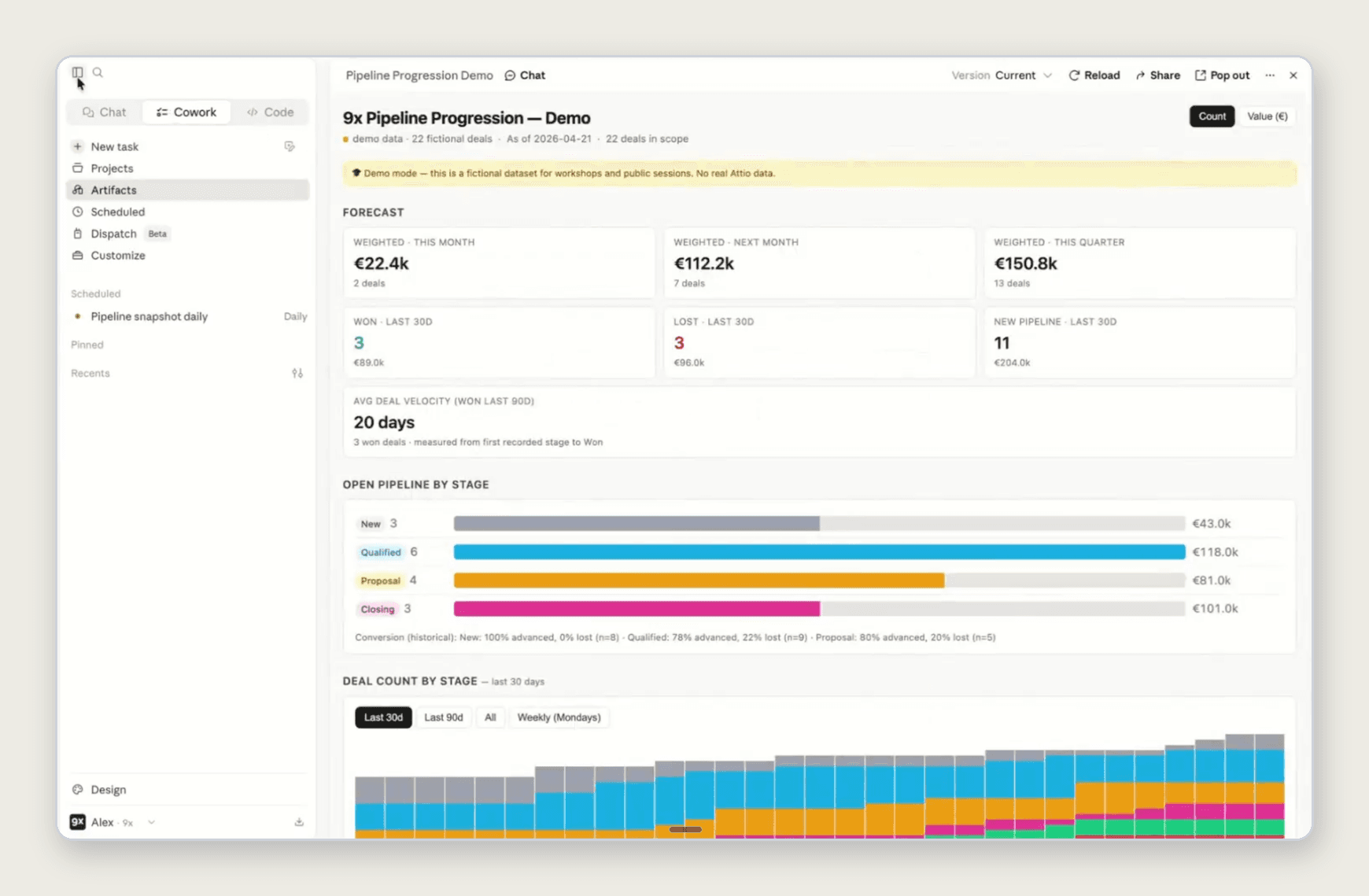
Connect your CRM and ask for a view of your pipeline, and you get something most CRMs can't show you out of the box: deals broken down by stage, a forecast, how the pipeline is moving over time, and, most usefully, what changed. Which deals moved forward, which slipped back, which you won or lost, and which have been stuck for more than a couple of weeks. Alex's version even renders a funnel visualisation of deals moving from one stage to the next, the kind of view you'd normally buy a plugin for. You describe the output you want, fine-tune it over a few iterations, and share it with the team once it's right.
A live pipeline dashboard built as a Cowork artifact during a 9x workshop: forecast, open pipeline by stage, and deal movement, pulled live from the CRM.
2. A drag-and-drop task planner
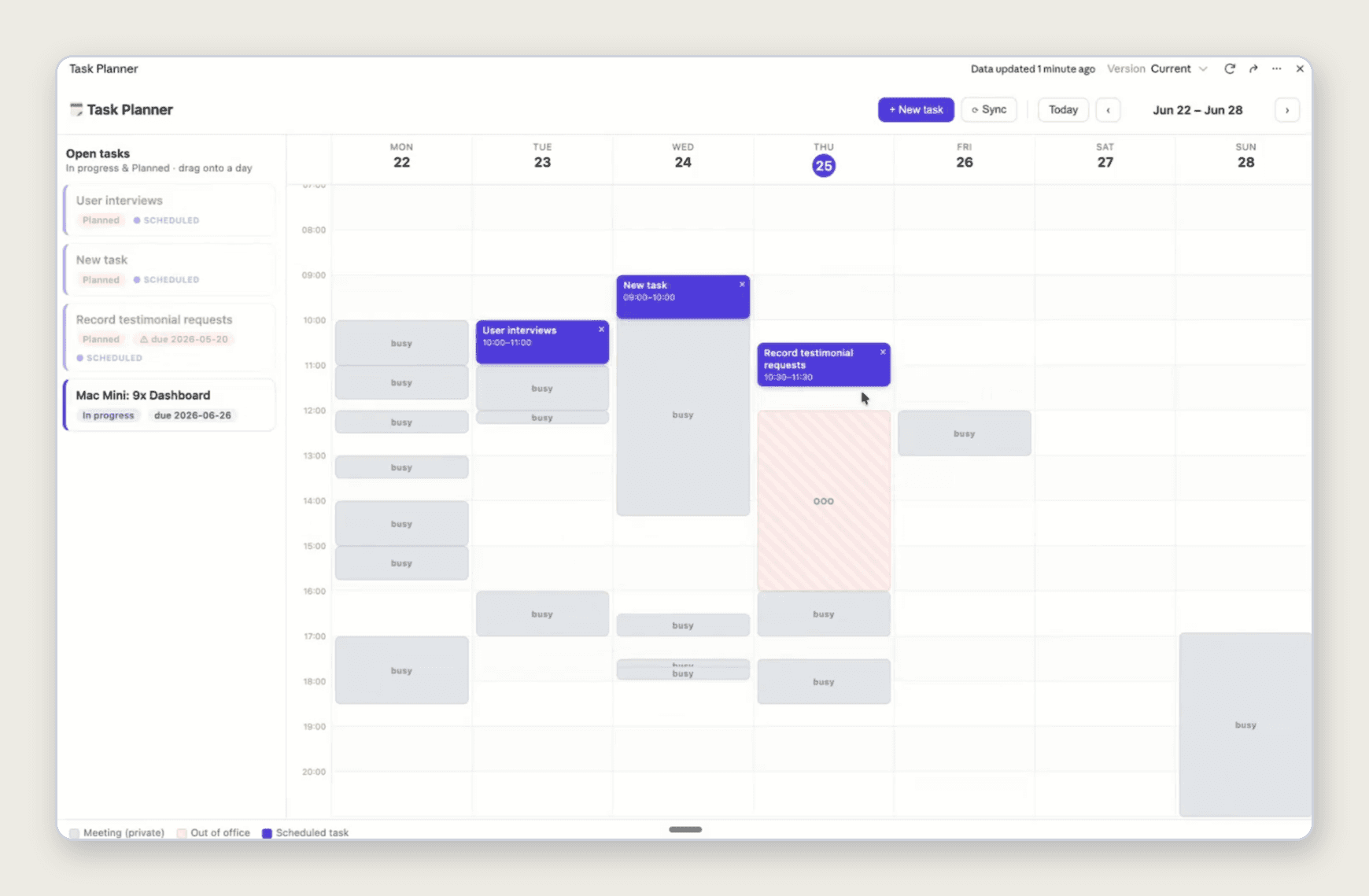
This one combines two tools. It pulls open tasks from Notion and meetings from Google Calendar into a single view, shows your calendar as blocks of busy time, and lists your tasks beside it, draggable straight onto a time slot. Add a button to create a new task from a form, and it writes that task back into Notion. It's a small thing, but it's a custom planner shaped exactly to how you work, built on data that already lives in your tools rather than copied into yet another app.
The task planner artifact: open tasks on the left, calendar on the right, drag a task onto a slot and it writes back to Notion.
3. A new-joiner onboarding scheduler
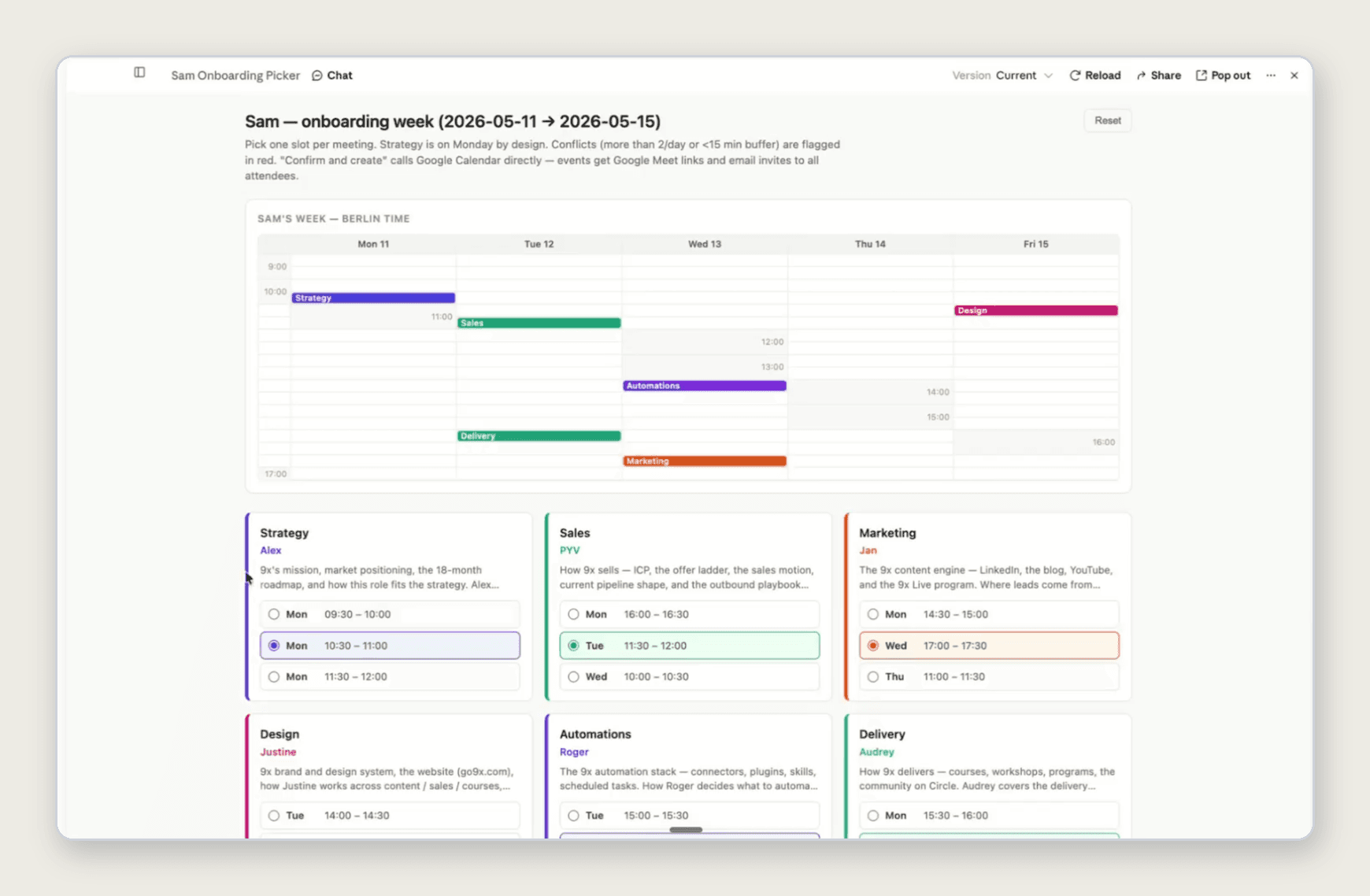
A sharper example of writing back to your systems. When someone joins, their first week means meetings with several people, and finding a slot that works for everyone is a scheduling headache. This artifact checks availability across the whole team, offers the slots where each person is free, and, with one button, books all the meetings in everyone's calendars. The interface does the coordinating; the connector does the booking.
The onboarding scheduler: pick a slot per meeting from each person's availability, and one button books them all in Google Calendar.
4. Counter reports: what's not working
A quietly powerful use case borrowed from sales operations. A normal report shows you your deals; a counter report shows you your gaps. Point an artifact at your CRM and have it surface the five deals nobody has followed up on in seven days, or anything breaking the standard you set for yourself. The same pattern works anywhere you have a process with a rule: it's an artifact whose whole job is to show you where you're slipping.
The thread running through all four: you're not asking Claude to build software from scratch, you're giving yourself a custom view and a set of actions on top of tools you already pay for.
"Most software you buy covers about 80% of your needs, but we all have specificities. Now with artifacts you have an additional solution. It's probably the first thing I would go to now to prototype it."
— Alex Kantjas, 9x co-founder
Why these beat off-the-shelf software
Every tool you buy covers the common 80% and stops. The last 20%, the custom view, the specific way your team looks at its data, the one action you do fifty times a day, is exactly what vendors don't build for you. The old answer was to hire developers or wire up a no-code tool. An artifact is now the fastest way to get that custom layer, at least as a prototype, and often good enough to keep. You become, in Alex's words, the product manager of your own mini applications. For more of these, our Claude Cowork use cases piece covers the wider set.
How to build your first artifact
The single biggest mistake is scope. People try to build everything at once, hand Claude a six-feature wish list, and end up with six things to debug. The habit that works is the opposite.
First, choose your data source. Local files are faster and cheaper for large datasets; connectors are slower but give you live, refreshing data you can share. Prove the value with an export first if the dataset is big, then swap in the connector.
Second, scope it narrow. Give Claude one clear, small job. You can always add features once the first one works.
Third, ship and iterate. Don't try to one-shot the perfect build. Get a rough version out, use it, see what's missing, and fix it one step at a time. As Alex says, think small, think focused.
One caution on how it looks. A three-line prompt like "build me a dashboard that does X" gets you generic, AI-slop design. Artifacts are custom HTML and CSS underneath, so the fix is specificity: describe the look you want, iterate on it, and you can bring it fully into your brand. If you want to see the whole build end to end, the live artifacts walkthrough runs through it in real time, bugs and all.
The bottom line
The Claude artifacts worth building are custom interfaces on top of your own tools: a live pipeline dashboard, a planner wired to your calendar, an onboarding scheduler that books the meetings, a counter report that flags what's slipping. Start with a simple dashboard on data you already have, keep the scope small, and ship and iterate rather than chasing a perfect one-shot. The point isn't to vibe-code a website, it's to build the custom layer your software doesn't give you.
If you want your team building these properly, on your own tools and in your own brand, our hands-on Claude Cowork training takes people from their first dashboard to internal tools that run the work.
Common questions
What can you build with Claude artifacts? Documents and diagrams at the simple end, and custom interfaces on top of your tools at the powerful end: dashboards, planners, schedulers, and reports that read from and write back to your CRM, calendar, Notion and other systems.
What's the most useful Claude artifact to build first? A dashboard on data you already have, ideally cross-referencing two tools. It's low-risk, quick to show value, and gets you comfortable before you try artifacts that write back to your systems.
Do Claude artifacts use live data? They can. Built in Cowork with connectors, a live artifact refreshes its data each time it loads. Built from local files, it's a snapshot until you rebuild it. Chat artifacts are snapshot-only.
Do you need to code to build a Claude artifact? No. You describe what you want in plain language and Claude writes the underlying HTML, CSS and code. The skill is scoping the job clearly and iterating, not programming.
FREE LIVE SESSIONS
What’s the best way to learn AI?
With 9x Live! Join a free session and learn the skills that’ll get you ahead of the 99%.
What to do next
1
Start learning free
Take our AI starter course and apply the latest technologies to your first use case. Completely free. Get started today.
2
Learn it live
Join a free weekly 9x Live session, watch work get automated in real time, and get your questions answered by leading educators. Sign up for the next session.
3
Watch our videos on YouTube
With one of the fastest growing channels in the industry, hundreds of thousands of people watch our tutorials every week. Subscribe here so you never miss a video.
Claude
read next

How to Build a Self-Improving AI Ad Creative System
A step-by-step guide to a self-improving AI ad creative system that researches, makes, launches and learns from its own ads, with the tools and real costs.

How to Use the Meta Ad Library for Competitor Research
The Meta ads library shows every ad your competitors run. Here's how to search it yourself, and how to have ChatGPT Work do the whole job for you.
read next
How to Build a Self-Improving AI Ad Creative System
A step-by-step guide to a self-improving AI ad creative system that researches, makes, launches and learns from its own ads, with the tools and real costs.
How to Use the Meta Ad Library for Competitor Research
The Meta ads library shows every ad your competitors run. Here's how to search it yourself, and how to have ChatGPT Work do the whole job for you.
Your new home for learning AI.
Weekly live workshops, on-demand courses, and plug-and-play downloadables. Get started for free today.
Your new home for learning AI.
Weekly live workshops, on-demand courses, and plug-and-play downloadables. Get started for free today.
Your new home for learning AI.
Weekly live workshops, on-demand courses, and plug-and-play downloadables. Get started for free today.